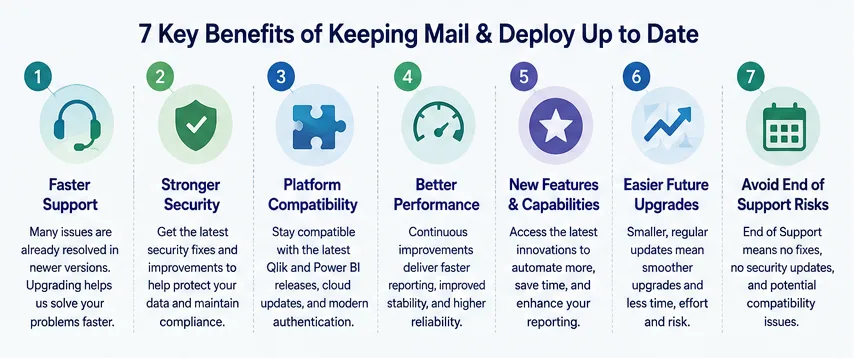
7 Key Benefits of Keeping Mail & Deploy Up to Date
Your reporting platform is a business-critical component of your analytics ecosystem. Whether you are delivering operational reports, executive dashboards, compliance documents, or customer communications, you rely on Mail & Deploy to distribute accurate information reliably and securely.
As with any enterprise software, regular updates are essential to maintaining performance, security, and compatibility. Running an outdated version may not cause immediate problems - but over time, it increases the risk of compatibility issues, security vulnerabilities, longer support cases, and unexpected downtime.
In this article, we’ll explain why staying on the latest supported version of Mail & Deploy is one of the best investments you can make for your reporting infrastructure.
When you contact our Support Team, one of the first questions we ask is:
“Which version of Mail & Deploy are you currently running?”
There is a good reason for this.
Every release contains bug fixes, stability improvements, and performance optimizations. Many issues reported by customers have already been resolved in newer versions. If you’re running an older release, our engineers often need to determine whether the issue still exists before investigating further.
By upgrading to the latest version before opening a support ticket, you can often:
This allows both your team and ours to focus on solving real problems rather than reproducing issues that have already been addressed.
Cybersecurity is an ongoing process - not a one-time project.
Each Mail & Deploy release includes maintenance updates designed to improve the security and resilience of the platform. Even if you don’t immediately need new features, security improvements alone make upgrading worthwhile.
Regular updates help you:
Organizations that postpone updates for several years often face significantly larger upgrade projects later. Keeping your software current is one of the simplest ways to reduce operational risk.
Both Qlik and Microsoft continuously release new versions of their analytics platforms.
New authentication methods, API changes, cloud improvements, and platform enhancements can all affect reporting solutions.
Running the latest Mail & Deploy version helps ensure compatibility with:
Updating Mail & Deploy before upgrading your analytics platform helps avoid compatibility issues and ensures a smoother transition.
Read our Qlik compatibility overview.
Not every improvement appears in the release notes as a headline feature.
Many updates focus on improving the overall performance and reliability of the platform, including:
These continuous optimizations accumulate over time and contribute to a more reliable reporting environment.
Mail & Deploy is continuously evolving. Each release introduces new capabilities designed to help customers automate reporting more efficiently while reducing manual work.
Depending on the version you’re currently running, newer releases may include improvements such as:
Rather than delaying upgrades for several years, smaller incremental updates make it easier for users and administrators to adopt new functionality.
Explore the latest Mail & Deploy release notes.
Many organizations postpone software updates because their current environment “still works.”
Unfortunately, this often has the opposite effect. Skipping multiple releases means:
Keeping your installation reasonably current makes every future upgrade significantly easier and less disruptive. Think of updates as routine maintenance rather than major migration projects.
Like every enterprise software solution, Mail & Deploy follows a defined product lifecycle.
Older versions eventually reach End of Support (EOS).
After a version reaches EOS:
Planning upgrades before your version reaches End of Support helps avoid unexpected operational risks and ensures your reporting environment remains fully supported.
View the current Mail & Deploy support lifecycle.
Updating Mail & Deploy is one of the simplest ways to improve the overall health of your reporting environment.
One upgrade can provide:
Instead of viewing upgrades as another IT task, think of them as an investment in the long-term stability and success of your reporting platform.
We recommend reviewing your Mail & Deploy environment at least once a year and including software updates in your standard IT maintenance schedule.
A healthy reporting environment should include:
If you’re unsure whether your installation is up to date, our team is happy to help. We can review your current environment, discuss available upgrade paths, identify any compatibility considerations, and help you plan a smooth transition to the latest supported version.
Need assistance with your upgrade? Contact our team today - we’re here to help you get the most out of Mail & Deploy.